
No matter how good your product is for private label sales on Amazon U.S., organic visibility is limited in the first few months. Expecting a new ASIN to be discovered on its own among millions of listings is not a realistic strategy. At this point, PPC (Pay Per Click) ads not only generate sales but also—just as importantly—create the sales velocity that fuels organic rankings. A properly structured Amazon PPC advertising strategy serves as the engine of growth for your brand from the very first day of launch. You can also check out our article , “Amazon Consulting: The Path to Success in E-Export,” which delves deeper into this topic.
In this guide, we take a step-by-step look at campaign types, targeting options, bid and placement calculations, how to optimize the Search Term Report using Excel, and how to integrate Brand Analytics data into your strategy—all as we actually implement them in the field. For more information on our services—ranging from account setup to product listings and operations—please visit our Amazon Consulting page.
Campaign Types: Sponsored Products, Brands, and Display
Amazon Advertising offers three main ad formats, each of which serves a different purpose in the sales funnel:
- Sponsored Products: These are individual product-focused ads that appear in search results and on product detail pages. Typically, 70–80% of the private label budget is allocated here; this is the primary source of sales.
- Sponsored Brands: The brand logo, headline, and multiple products appear at the top of search results. Requires Brand Registry; used to boost brand awareness and drive traffic to the Store.
- Sponsored Display: Retargets users who visited your product page but didn't make a purchase and increases visibility on competitors' ASIN pages. It makes more sense to activate this feature later in the launch process.
Distinction Between Automatic (Auto) and Manual Campaigns
There are two targeting methods within Sponsored Products. In an automatic campaign, Amazon decides which searches to show your ad on based on your listing content; there are four targeting groups: close match, loose match, substitutes, and complements. In a manual campaign, you specify the keywords and bids yourself.
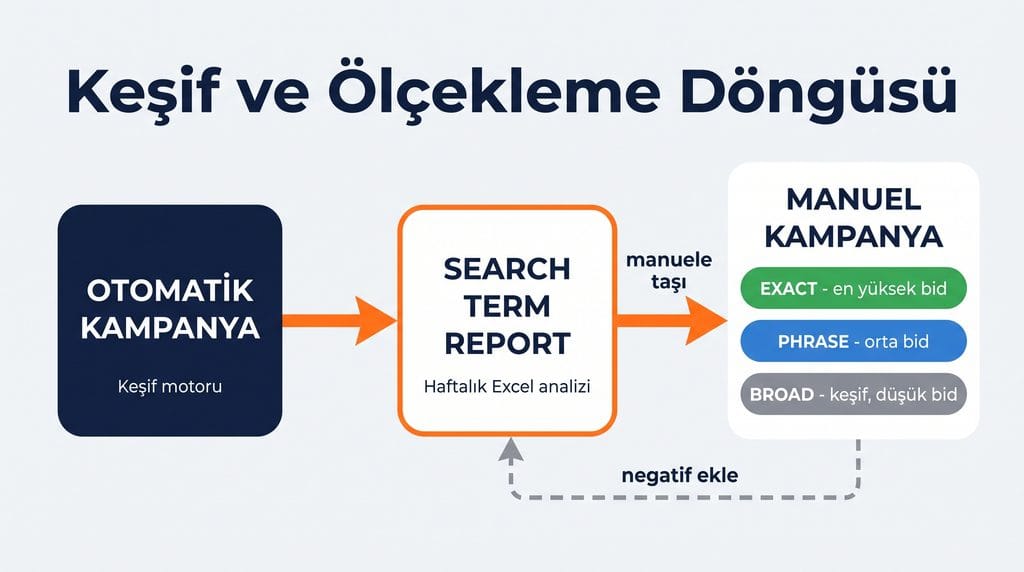
The standard workflow is as follows: At launch, an automated campaign is set up as a discovery tool and collects data for 2–3 weeks; search terms that drive conversions are then moved to a manual campaign. The automated campaign is not paused at this point; it continues its discovery mission on a low budget. This cycle (discovery, harvesting, migration) is the backbone of PPC management. To learn how we manage the launch process and ad management, please visit our Amazon Launch and Ads page.
Match Types: Broad, Phrase, Exact
| Matching Type | How It Works | Intended Use |
|---|---|---|
| Broad | Words match in any order, including synonyms and close variations | Wide search, low bid |
| Phrase | A phrase can consist of the same sequence of words, with additions at the beginning or end | Controlled exploration, medium bid |
| Exact | The search term matches exactly (or a very close variation) | Proven keywords, highest bid |
Let’s clarify this with a concrete example. Let’s say your keyword is “Turkish towels”:
- Exact: Appears only in searches for “turkish towels” (and very close variations, such as singular or plural forms, e.g., “turkish towel”). Traffic comes in its narrowest, most controlled form.
- Phrase: The phrase “Turkish towels” is preserved in the same order; words can be added at the beginning or end: “black Turkish towels,” “Turkish towels for the bathroom,” “best Turkish towels 2026.” The phrase remains intact.
- Broad: Words may appear in a different order, and new words may be inserted between or around them: Different combinations, such as “black organic Turkish cotton towel” and “Turkish-style towel set,” also match. This is where the bulk of traffic comes from; it is the primary source for discovering long-tail searches, but it also carries the highest risk of irrelevant matches.
Best practice: The bid hierarchy is structured as follows: exact > phrase > broad. If the same keyword appears in all three match types, you’ll want traffic to flow to the most efficient (exact) campaign; adding that keyword as a negative keyword in the broad campaign is a common technique for directing traffic.
Bid Math: CPC, Dynamic Bidding, and Placement Settings
Amazon PPC is an auction-based system. CPC (Cost Per Click) is the amount you pay per click, and you typically pay not the full amount of your maximum bid, but just a little more than the next-highest bid. In other words, your bid is a ceiling price, and the actual CPC is often lower than that.
Dynamic Bidding Strategies
- Lower only: Amazon lowers its bid for clicks deemed unlikely to convert. This is the recommended default setting for the early stages of a launch; since there are still few reviews and little social proof, the conversion rate is naturally low, so it makes more sense to rein in the budget rather than be aggressive at this stage.
- Up and down: If the likelihood of conversion is high, the bid can be increased up to 100%; if it is low, the bid is reduced. This is effective in proven exact-match campaigns but can quickly deplete the budget.
- Fixed: The bid remains constant. This may be preferable in controlled tests.
Placement Setting: Top of Search Percentage
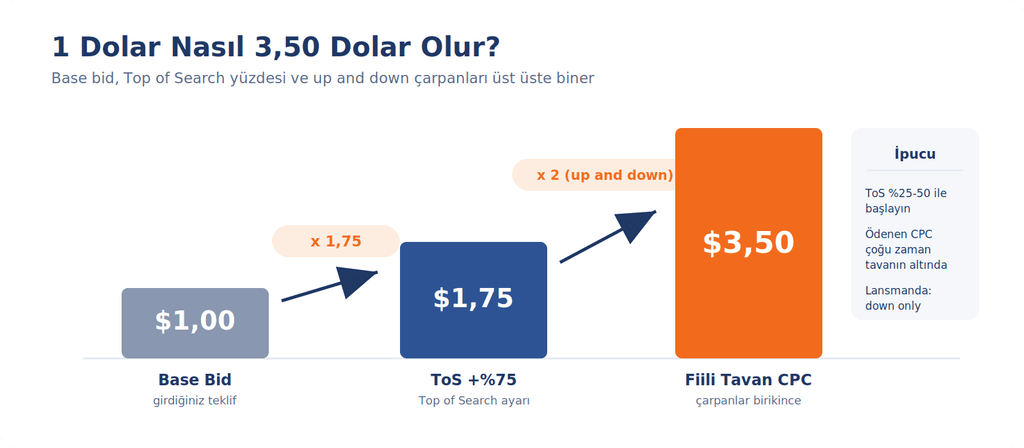
In campaign settings, you can define separate percentage increases for three placements: Top of Search (top of the first page), Rest of Search, and Product Pages. This is the setting you use when you say, “Increase my bid by X% when my product appears at the top of the first page.” It’s important to understand the math here, because the multipliers stack on top of each other:
Example: Base bid of 1.00 USD + “Top of Search” setting at 75% = 1.75 USD cap. If an “up and down” strategy is added, Amazon can increase this by up to 100%: 1.75 x 2 = 3.50 USD. In other words, a 1-dollar bid can turn into a 3.50-dollar click without you realizing it. It’s better to increase the placement percentage gradually (starting in the 25–50% range) based on that placement’s actual conversion data.
How Is the Maximum Bid Calculated?
Rough formula: Maximum CPC = Product selling price × Conversion rate (CVR) × Target ACoS. For example, for a product priced at 14.99 USD, with a 12% conversion rate and a 30% target ACoS: 14.99 × 0.12 × 0.30 = 0.54 USD. This is the maximum click cost you can pay while maintaining your profit target for that keyword. During the launch period, you may intentionally exceed this ceiling—but only if you understand that this is an investment decision.
Metrics Monitoring: ACoS, TACoS, CPC, CTR, CVR
| Metric | Definition | Practical Commentary |
|---|---|---|
| ACoS | Advertising spend / sales generated by advertising | The target is determined based on the profit margin |
| Break-Even ACoS | An ACoS level equal to your profit margin | Below that is profit, above that is a loss (in terms of advertising) |
| TACoS | Ad spending / total sales (including organic) | If it decreases over time, it means it’s growing organically |
| CPC | Cost per click | Word-based competitiveness indicator |
| CTR | Click / Impression | If it's low, it's a problem with the main image, price, or title |
| CVR | Order / Click | If it's low, there's an issue with the listing content and reviews |
Example: If your profit margin is 35%, your break-even ACoS is 35%. It is common to operate with an ACoS of 45–60% during the launch phase (to build visibility and accumulate reviews); during the maturity phase, the target is typically reduced to the 20–30% range.
ACoS Is Not a Measure of Success on Its Own
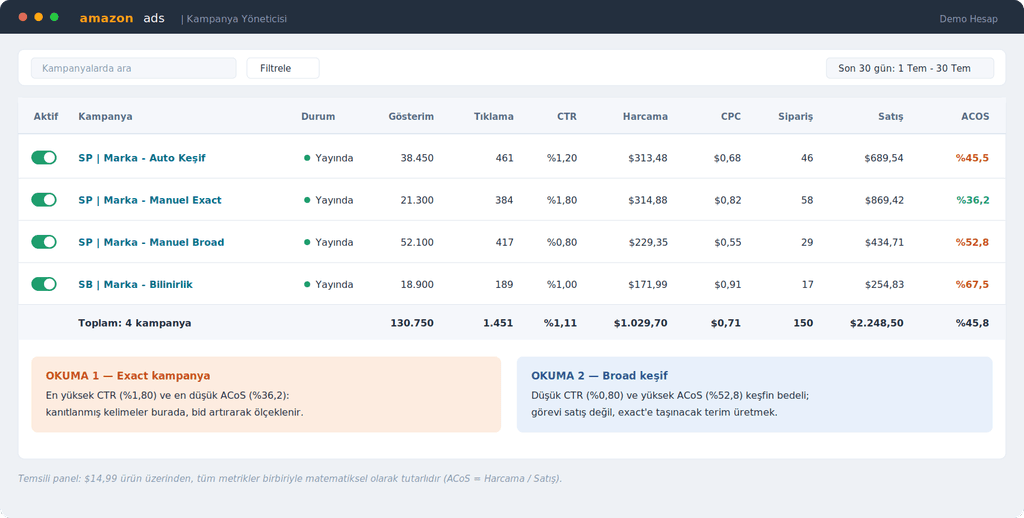
There’s a common mistake here: treating ACoS as an absolute measure of success. The same 25% ACoS means very different things for a $200 product and a $15 product; click costs, margin structure, and ad spend per order are completely different. Your true benchmark should always be your own profit margin, not the ACoS figures of others in your category.
Additionally, ad performance isn’t solely the result of campaign settings. Your pricing in that niche, the quality of your main image (which directly affects CTR), your headline, and your review status are all part of the equation. If your metrics are low, the solution isn’t always in the bid—sometimes it’s on the listing side: a stronger main image boosts CTR, while more compelling content and price positioning drive up CVR and deliver a much better ACoS with the same budget.
TACoS: The True Health Indicator of Advertising
TACoS (Total Advertising Cost of Sales) divides advertising spend not just by sales generated from ads, but by total sales, including organic sales. Example: If monthly ad spend of $1,000 generates $2,000 in ad sales, the ACoS is 50%; but if your total sales are $5,000, the TACoS is 20%. Since PPC fuels organic rankings, this is the key trend to watch: if TACoS decreases over time while ACoS remains constant, it means advertising is successfully fueling organic traffic. If TACoS rises month over month, growth may be becoming increasingly dependent on advertising, and the listing/organic side needs to be reviewed.
Optimization with Excel: The Search Term Report Loop
The backbone of PPC optimization is the Search Term Report, which you can download from Seller Central under Reports > Advertising Reports. You should export this report to Excel weekly (twice a week during the launch phase) and follow a three-step process:
- 1) Negative targeting: Sort the search terms in the pivot table by spend. Add any terms that generate meaningful clicks (e.g., 10–15 clicks) but produce no sales as negative exact matches. This stops the silent drain on your budget.
- 2) Harvest: For automatic and broad campaigns, move keywords that have generated two or more orders and have an ACoS below the target to a manual exact-match campaign; add the same keyword as a negative keyword in the source campaign.
- 3) Bid adjustment: A simple set of rules is sufficient: If the ACoS is significantly below the target, increase the bid by 10–15% (to gain impression share); if it’s above the target, lower it by 10–15%; if you’re not getting any impressions, gradually increase the bid. Terms with a high conversion rate but low CPC represent the most valuable opportunities; scaling this inexpensive, high-converting traffic by raising the bid generates significantly more sales from the same budget. Taking small, consistent steps rather than making large leaps keeps the data readable.
The power of this cycle lies not in its complexity, but in its discipline. Using the same Excel template every week makes the campaign history easy to understand at a glance.
Brand Analytics: Linking Data to Strategy
Brand Analytics, available to sellers enrolled in Brand Registry, serves as the compass for PPC. The Top Search Terms report shows the actual search volume rankings within your category and the click share and conversion share values for the top three ASINs for each term. It allows you to build your own keyword list based on Amazon’s own data, rather than on guesswork. Search Query Performance, on the other hand, breaks down your brand’s impressions, clicks, and purchase funnel for each query, clearly showing where you’re gaining visibility but losing conversions. When combined with the Search Term Report, these two reports transform bidding decisions from guesswork into data-driven decisions. For details on the Brand Registry process—a prerequisite for accessing Brand Analytics—please refer to our Amazon Brand Registry and Transparency guide.
Weekly Amazon PPC Ad Management Routine: Summary Table
| Frequency | Action |
|---|---|
| Twice a week (launch) | Download the Search Term Report, negative filtering + harvest cycle |
| Weekly | Bid adjustments (in 10–15% increments), budget exhaustion time control |
| Weekly | Placement Report: Top of Search Conversions vs. Percentage Target Alignment |
| Monthly | Updating the keyword list with Brand Analytics, monitoring TACoS trends |
| Monthly | Campaign structure review, Sponsored Display retargeting assessment |
Frequently Asked Questions (FAQ)
What should the ideal ACoS be?
There is no single correct number; your reference point is your profit margin. An ACoS equal to your margin is the break-even point. A range of 45–60% during the launch phase and 20–30% during the maturity phase are common targets.
When does an automated campaign end?
It is generally not turned off. Even after manual campaigns become the main source of traffic, the automated campaign continues to discover new search terms with a low budget.
Is "broad" or "exact" better?
They are not competitors; they complement each other. Broad targets discovers opportunities, while Exact capitalizes on them. The budget and bid hierarchy are structured in favor of Exact.
What percentage should I set for "Top of Search"?
If your "Top of Search" conversion rate in the placement report is significantly higher than that of other placements, it makes sense to start with 25–50% and increase it gradually. Don’t forget to factor in the multiplier effect (up to 2x) when using the "up and down" strategy.
Is organic ranking possible without PPC?
Theoretically, yes, but in practice, it’s quite difficult for a new ASIN. PPC drives sales velocity, and sales velocity fuels organic rankings; the two work together.
Conclusion
Amazon PPC isn’t rocket science; it consists of a properly set-up structure (auto + manual, with an exact-match-priority bid hierarchy), a few basic formulas (break-even ACoS, maximum CPC), and a disciplined weekly Excel routine. The hard part isn’t the technical aspect—it’s consistency. If you want to take a look at the entire private label journey, our Amazon Private Label Starter Guide is a great place to start.
As an Amazon SPN Verified Partner, we provide end-to-end support for Amazon launches, PPC ad management, and account operations in the U.S. If you’d like to work with us to plan the right campaign strategy for your product, please contact us.

